


Company branches and default address
In Settings → Business Address add each location, pick the default, and set tax and the map when you need them.
On this page
Who is this lesson for?
- Company admin: adds every office or branch and picks which one is the default.
- Employees: do not open this page. Attendance and new records use the default address unless they pick another.
Before you start
- You need permission to manage company settings.
- Have the street address of each branch. Tax name and number are optional. Latitude and longitude are optional if you will pin the map.
Open Business Address
From the menu: Settings → Business Address.

Attendance and other modules use the default address. When someone creates a record they can still pick a different branch.
| Column | What it is |
|---|---|
| Location (GPS) | The branch name. A map pin opens Google Maps when latitude is saved. |
| Address | The street address. |
| Country | The country of that branch. |
| Tax Name | Tax name and number when you entered them. Empty shows --. |
| Default | The radio that marks the default branch. Only one can be default. |
| Action | Edit on every row. Delete on every row except the default. |
Add New Address or Edit
Click Add New Address, or Edit on a row. The fields are the same.

| Field | What it is |
|---|---|
| Country | The country of the branch. |
| Location | Required. A short name, for example the city or Branch 1. |
| Tax Name | Optional. The name printed with the tax number. |
| Tax | Optional. The tax number of that branch. |
| Address | Required. The full street address. |
| Latitude / Longitude | Optional. Type them, or set them from the map in the next step. |
Pin the location on the map
Under Latitude and Longitude is Business Location on Map.
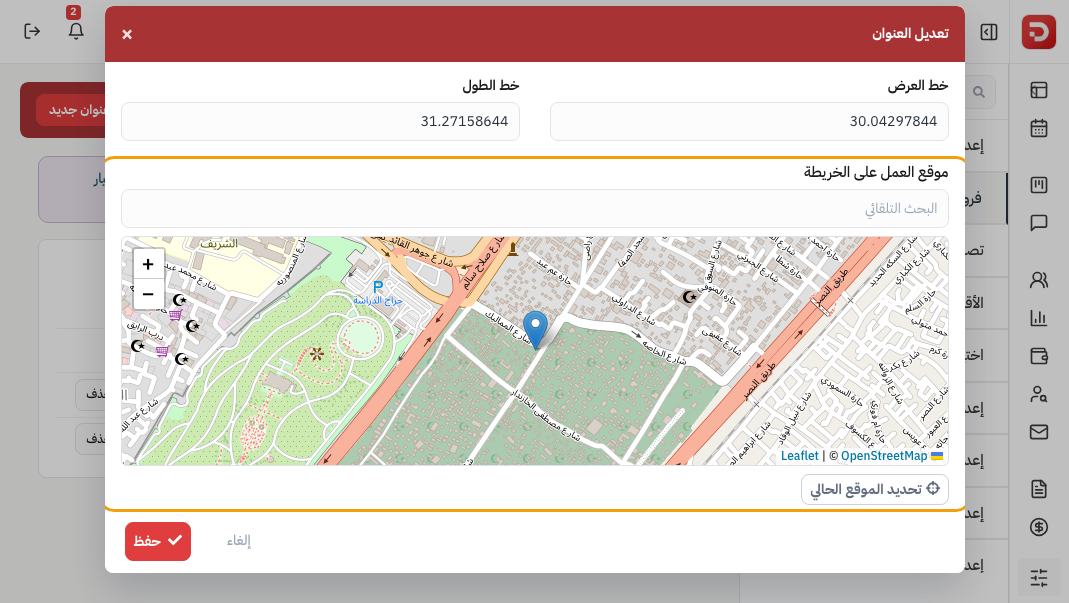
Three ways to set the point. Each fills Latitude and Longitude:
| Way | What it does |
|---|---|
| Autocomplete Search | Type a place (at least 3 letters). Pick a result. The pin moves. |
| The map | Click a point, or drag the pin. |
| Set current location | The browser asks to use this device's location, then drops the pin there. |

If Address is empty, the chosen place fills it. You can still type Latitude and Longitude yourself — the pin follows when you leave the field.
Save
Click Save. Or Cancel.
Default, edit or delete
Click the Default radio on a row to make that branch the default. Edit opens the same fields. You cannot delete the default — pick another default first.
What happens after you save?
- The branch appears in the list and in address pickers on new records.
- Attendance uses the default until someone picks another.
- A map pin on the location opens the saved coordinates in Show on Map.
Common questions
Must every branch have tax?
No. Leave Tax Name and Tax empty if that branch has none.
Why is Delete missing on one row?
That row is the default. Set another default, then you can delete it.
Does the list pin need a map point?
Yes. Save Latitude and Longitude — type them, search, click the map, or use Set current location.
Next: Company categories.