


Assign review cycles
Pick a template, choose people or a department, set dates and frequency, then assign the cycle.
On this page
Who is this lesson for?
For HR: put a published template on a schedule so each person gets a review at the right time.
Before you start
- At least one published template.
- The employees (or department / project) you will measure are already in the company.
Open Reviews
From the menu: Employee KPI → Reviews.
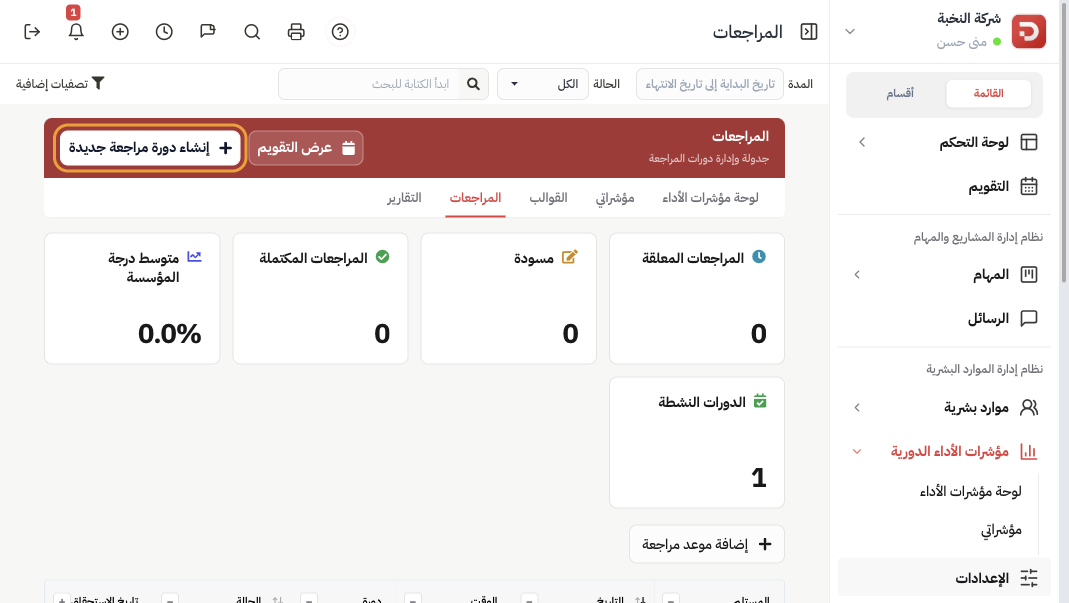
Click Create new review cycle. You can also start from a template row with Assign.
Choose the template and the people
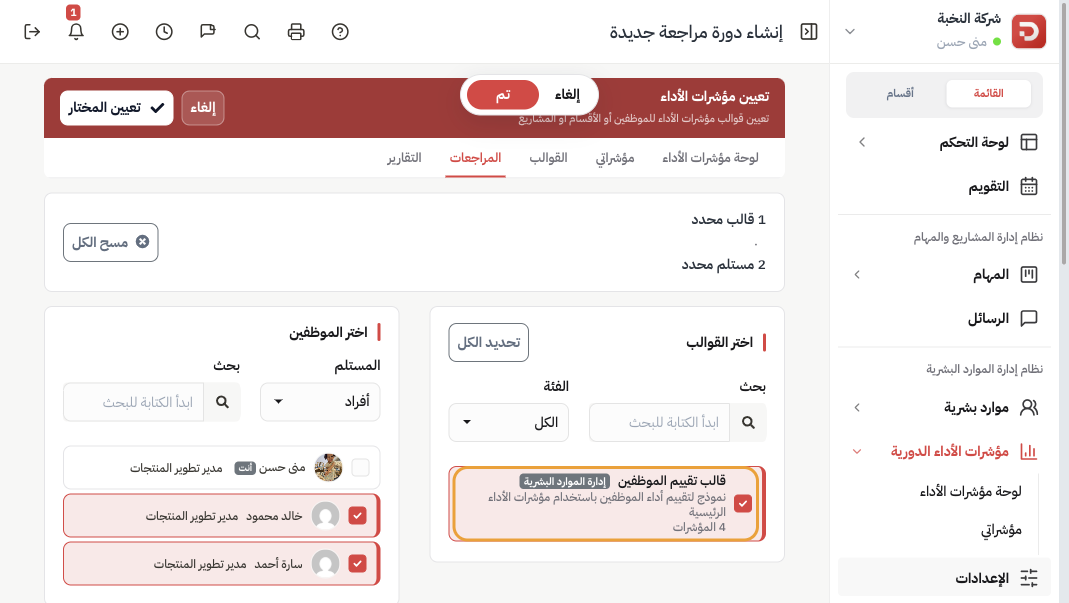
- Select KPI Templates: tick one or more published templates. Filter by category if the list is long.
- Recipient: Individuals (people), Departments, or Projects.
- Tick who should be reviewed. Example: Khaled Mahmoud and Sarah Ahmed.
The header shows how many templates and recipients are selected. Assign selected at the top assigns what you already picked — the same as the button at the bottom.
Dates, frequency, and review settings
Scroll to Assignment and reviewer settings.
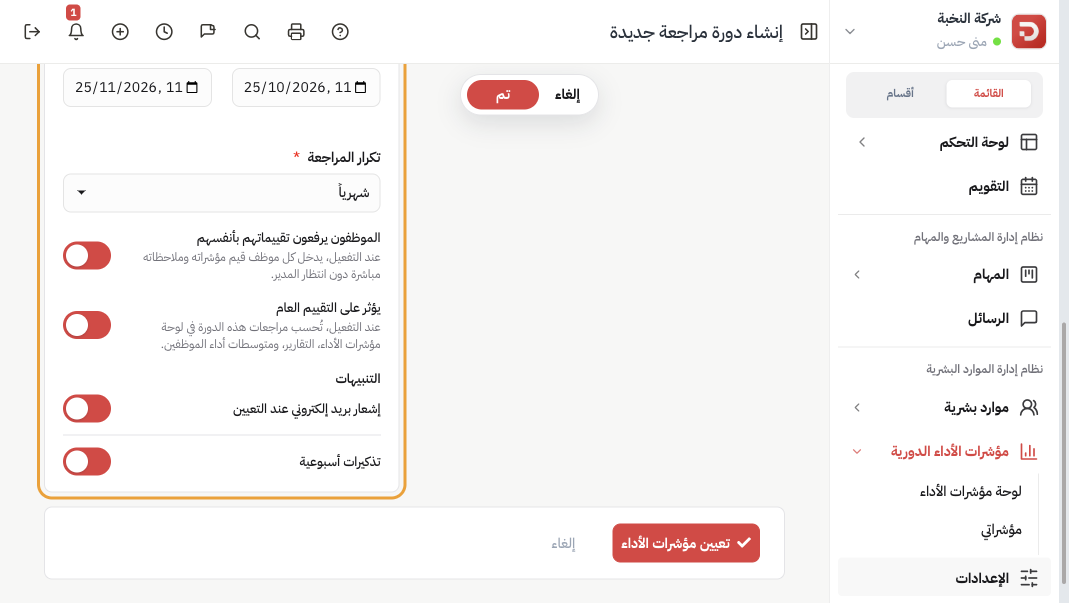
| Field | What it is |
|---|---|
| Cycle name | Filled for you from the template, the people, and the dates. You can still read it before you assign. |
| Start / end | The window in which reviews are created. Example: 25 Oct – 25 Nov. |
| Review frequency | Hourly, daily, weekly, every two weeks, monthly (default), quarterly, or every N hours / days / weeks / months. Monthly creates one review slot per month inside the window. |
| Employees submit their own reviews | On (default for people): each employee enters values and notes. Off: you must pick a reviewer who fills the form. |
| Affects overall evaluation | On (default): submitted scores count on the KPI dashboard, reports, and the employee average. |
| Notifications | Email when assigned, and weekly reminders. Leave both on unless you will follow up yourself. |
Click Assign KPIs. Reviews appear on the Reviews list and on the calendar.
What happens after you assign?
- Each selected person gets a pending review for the first slot.
- If self-submit is on, they open My KPIs (or Reviews) and fill the form. Next: cycle reviews.
Common questions
The employee fills the review, or someone else?
Employees submit their own reviews on (default for people): each selected person opens My KPIs or Reviews — on the site or in the app — and types their own numbers and notes. The manager does not fill the form first.
Off: you pick a reviewer. That person fills the form for each employee. The employee does not enter values.
Match the toggle to the job of the cycle:
- Daily or weekly report from the employee — frequency Daily (or Weekly), self-submit on. Example: Sarah Ahmed, sales. Every evening she enters visits, invoices, and complaints from the app. It is her daily report, not a manager sitting with her.
- Hourly log on a shift — frequency Hourly, self-submit on. Example: a clinic receptionist records waiting time and completed bookings at the end of each hour.
- Manager appraisal — frequency Monthly or Quarterly, self-submit off, reviewer = the line manager. Example: Khaled’s manager scores quality and deadline compliance once a month. Khaled does not type the scores.
- Employee draft, then manager confirm — self-submit on, then the manager opens the submitted review and clicks Confirm. Sarah fills; HR or the manager signs off. See cycle reviews.
Affects overall evaluation — on or off?
On (default): submitted scores from this cycle count on the KPI dashboard, in reports, and in the employee’s average. Use when this cycle is the official score.
Off: people still fill and submit. The reviews stay on the Reviews list and calendar. They do not move the employee average, the organization score, or report totals. Use when the cycle is only a log you want on file.
Examples:
- Official monthly KPI — Monthly, overall on. With self-submit on, Sarah enters her month. With self-submit off, her manager enters it. Either way the score is her performance average.
- Daily report that must not change the official score — Daily, self-submit on, overall off. Sarah’s evening log is stored and can be opened later. Her average still comes from the monthly cycle, not from 30 daily rows.
- Checklist or incident log — Daily or Weekly, overall off. Example: closing checklist (Yes/No) or safety notes. Useful history; not part of the performance average.
- Two cycles on the same people — one monthly appraisal (overall on) and one daily sales log (overall off). Dashboard and reports keep the official score from the monthly cycle. Open the daily rows from Reviews when you need the log.
Department instead of names?
Set Recipient to Departments and tick the team. Everyone in that department is included.
Project KPIs?
Set Recipient to Projects. Self-submit is hidden; pick who adds the project review. Turn Affects the project evaluation on if those scores should count on the project, or off if it is only a project log.
Wrong people on a live cycle?
Edit the cycle from Reviews, or delete it and choose how existing reviews are handled.