


Work on a project
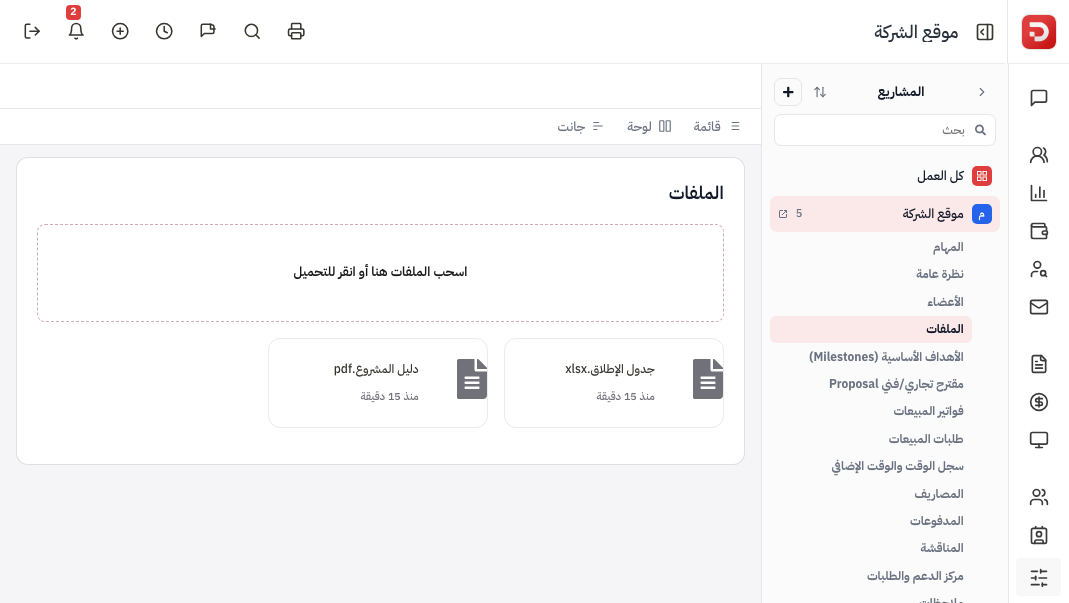
Select the project in the rail. Tabs under it are tasks, Overview, Members, Files, Milestones, discussion and notes. Overview shows members, project KPIs and progress. On the app the same tabs.
On this page
Who is this lesson for?
- Company admin and employees on the project.
- Clients: see the tabs they are allowed on that project.
Before you start
- The project is already in the rail.
Select the project
Tap the project in Projects. Tabs under it: Tasks, then Overview, Members, Files, Milestones, discussion, notes, and finance tabs if those modules are on.

The board then shows that project’s tasks only. All work shows every task.
Overview
Overview is the project at a glance: status, dates, progress, members, files, hours, budget, summary and Project KPIs.

Members
Members are who works on the project. Add or remove from this tab. Add Project Members.

Milestones
Milestones are the project’s main goals. Title, dates, cost, complete or not.

Files, discussion, notes
Files holds uploads and links. Discussion is a thread on this project — the team replies. Notes are records on the project, not a chat. How they differ: project discussion and notes. Invoices, payments, time logs and tickets appear when those modules are on.
The app
Open the project. Tabs: Overview, Members, Milestones, Tasks, Files, Discussion, Notes, then finance tabs.

Overview
Actions: Edit details, send a payment, Change status. Then progress, dates, client, budget and hours.

Members
Add members on the plus. Each row is a member.

Milestones

Tasks
The project’s tasks. Plus adds a task on this project. Filter by status.

Files

Discussion
New discussion. Empty until you add one. Then name, category General, first message, Save.


Notes
Add a note, write, Save.
What happens after?
- Tasks on the board belong to this project when it is selected.
- KPIs on Overview follow the review you assigned to the project.
Common questions
No Members tab?
The project is public, or you cannot view members.
No Project KPIs?
The Employee KPI module must be on, and a review assigned to this project.
Next: Project discussion and notes.